01
Outdated data in reports
The drawing is at Ø45. The stress report and the assembly tooling document still use Ø42.
Who notices this?
Drawings, reports, supplier files, intranet tools…
No more copy-pasting.
See your engineering data in one place, live.
…and whatever else you have
| Drawing | Coating | Thread | Reserve | Supplier | Flag |
|---|---|---|---|---|---|
| DWG-0010 | Chromium | UNF | 1.02 | Qualified | |
| DWG-0011 | – | UNF | 1.58 | Qualified | |
| DWG-0012 | Chromium | M12 | 2.79 | In audit | |
| DWG-0013 | – | UNC | 3.12 | In-house | |
| DWG-0014 | Anodised | M10 | 1.41 | Qualified | |
| DWG-0015 | – | UNF | 2.05 | In-house |
800+
CAD Drawings
Live-monitored -> Manufacturing team always checks to latest tolerances.
26000+
Fasteners
Compared -> Stress team sees which bolts moved and changed sizes
200+
Email PDFs
Live-collected -> Human checker always sees latest status
2
Weeks
Fastest delivery record
Scenarios
With how much effort?
01
The drawing is at Ø45. The stress report and the assembly tooling document still use Ø42.
Who notices this?
02
A supplier goes bankrupt — bearing PB-15B is not procurable after 2028, and it sits inside assemblies nobody has looked at for years.
Where are we impacted?
03
Three suppliers return inspection plans. Supplier 2 attached a Type Q plan where Type B was required — and every attachment is still checked by hand.
How can we remove this workload?
04
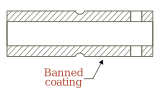
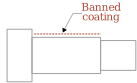
An audit finds a banned coating still in use, and the answer is due in hours — not after a week of opening files one by one.
How to batch check the 2000+ drawings in the company?
| Thread | M8×1.0-6H |
| Load | 14.2 kN |
| Ø12.5 H7 | 12.507 |
| Ra 1.6 | Ra 3.2 |
Drawings, reports, supplier files, intranet tools…
Auto-collect data, auto-flag errors. No-AI repeatable checks.
Built by a mechanical engineer, 10+ years in aerospace.
Not a two-year IT software project.
Enjoy the immediate relief.
Data in spreadsheet format, prioritizing your teams' immediate usage.
No need to buy new tools. Use what you have to the maximum instead.
Pay own, yours forever.
Read, understand, modify - your freedom.
 Drawing dimensions
 Drawing tolerances
 Stress report
 Email attachment
 Part Number List
 Legacy tool data
 BOM
BOM Manufacturing Plan
 Procurement List
 Intranet database
 Excel
Excel SharePoint site
 Google Sheets
 Google Docs
That's my specialty: enabling automation in strict corporate environments, using minimal (or zero) external tools.
Most solutions are designed around existing tools already allowed by your company IT.
Let's look at your company toolkit and discover the opportunities.
The tool is directly made by me, an aerospace design engineer working 10+ years on aviation design. I've worked for years directly with production: machine operators, suppliers, shop-floor realities, in German.
This means I can fully follow your team's daily technical needs, and implement them into the tool, without you having to make a software engineer understand your work.
The default design philosophy: the architecture stays inside your environment — your browser, your company spreadsheet tool, or a local database.
Where an external tool would genuinely serve you better, it's proposed openly and decided together, within your company's policy.
The final delivery includes a working setup, on your company computer. With full source code, documentation, and a one-page summary written for IT.
By default, no. Technical decisions in mechanical engineering often need deterministic automation on the front line.
Deterministic means: same design rule, same input, same diagnosis. (Example: if a thread text on a drawing is not written in a specific way, it is reliably flagged as a fault.)
Deterministic assessment is not AI's strength. In most cases it's cheaper and more reliable to leave AI out — ineffective AI use adds unpredictability to check processes, with little added value and high running cost.
But there are cases where AI genuinely helps. I'm glad to help your team make an informed decision on what combination works best for your scope.
Transparency: partially. As the human engineer, I use my 10+ years of engineering background to uncover the root pain point, define the spec, the architecture and the tech-stack choice.
I shape the detection rules with your senior engineers, and test edge cases with my engineering knowledge.
AI is used as a power coding tool, so a big part of the software can be produced and iterated in days.
That's how you get a working tool in weeks instead of years.
All delivered code is human-reviewed.
Specific design errors you need to catch? A manual process everyone hates? Let's take a look.
Book a call
Pick a slot. No preparation needed.